Every year since 2004, the Google Santa Tracker project has helped visualize the route taken by the legendary character Santa Claus each December to distribute gifts to kids around the world.
Though December is months away, preparations are in full swing at Santa's home in Lapland. The Google Santa Tracker is also getting ready, and rumors are that this year is going to be especially interesting. A secret team of Engineers in Light-speed Flights (ELF), in collaboration with the Gnome Institute of Generous Gift Logistics Engineering (GIGGLE) in Lapland, is working to develop new experimental optimization algorithms that help Santa deliver gifts more effectively.
The early results are promising, but Santa thinks they can be improved. When Santa learned about the famous optimization skills of Hash Code participants, he asked if Hash Code World Finalists would be able to help out. Are you up for the challenge?
Santa is delivering gifts on a frictionless 2D plane, using a reindeer-powered sleigh that accelerates using... carrots 🥕.
Your task is to plan actions for the sleigh to make gift deliveries and maximize the total score.
The world is a 2D grid with integer coordinates. We refer to a cell at column and row as ().
The distance between two cells and is calculated as (Euclidean distance).
Santa starts at Lapland where all the gifts are stored.
:::align{center}
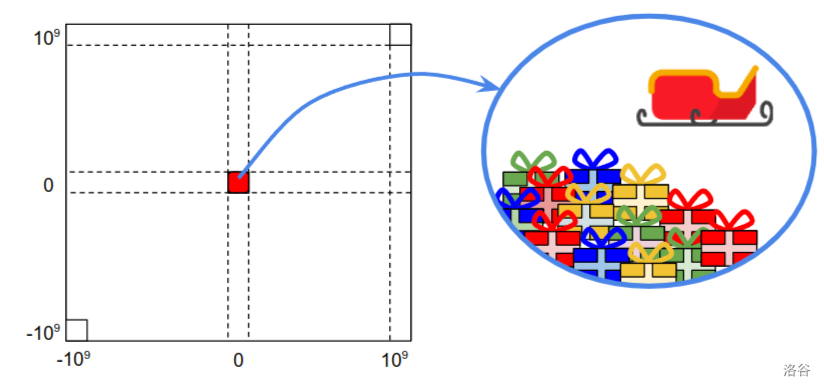 :::
:::
Santa only has seconds to deliver the gifts, so hurry up!
There are two types of things Santa can load onto his sleigh: gifts and carrots.
Gifts need to be delivered to children around the world. You are given the list of gifts, for each of which you know:
Carrots are food for Santa's magic reindeer who need to eat them to accelerate. Each carrot weighs kg (yes, we know they are heavy... but they really are magic!).
Thanks to a very effective team of helper gnomes, gift delivery happens instantaneously at the beginning of the second. Similarly, gift/carrots pick up happens instantaneously at the beginning of the second.
Santa can deliver gifts to all children within a maximum distance of (inclusive) from his sleigh. Similarly, Santa can pick up gifts and carrots whenever the sleigh is within a maximum distance of (inclusive) from his base at . We call this maximum distance of "range".
::::info[For example:]
For example, for the range and the sleigh at :
:::align{center}
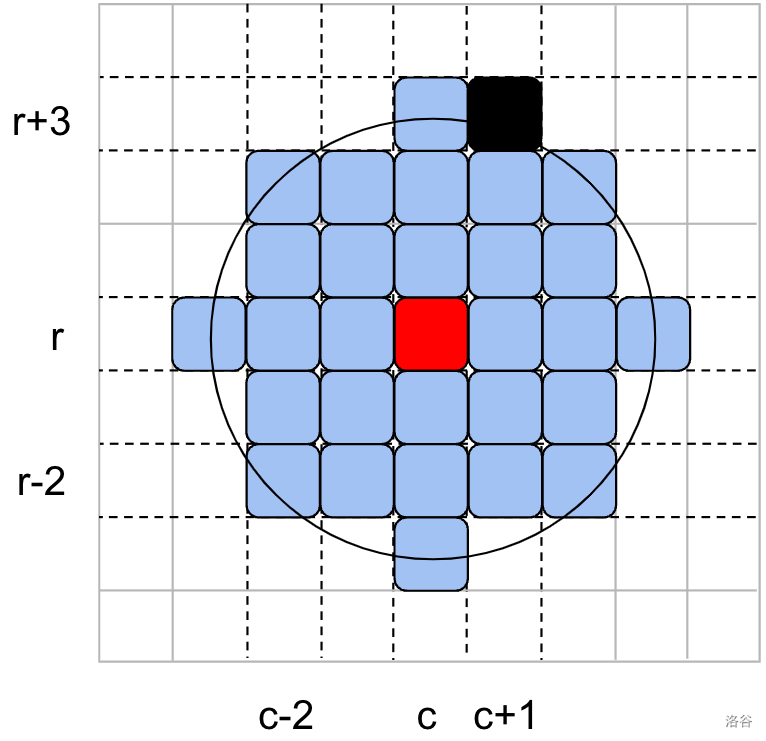 :::
:::
::::
Santa moves around the world on his magic sleigh.
Thanks to the magic coating on his sleigh, Santa encounters no friction and conserves speed indefinitely. At any point the movement of the sleigh can be described as its velocity , denoting how fast the sleigh moves in each direction within one second.
Santa starts with the velocity of (not moving).
::::info[For example:]
For example, in the figure below the sleigh is initially at position and its velocity is .
As long as the velocity remains constant, after each second the sleigh will move 1 position to the right and 2 positions upwards.
:::align{center}
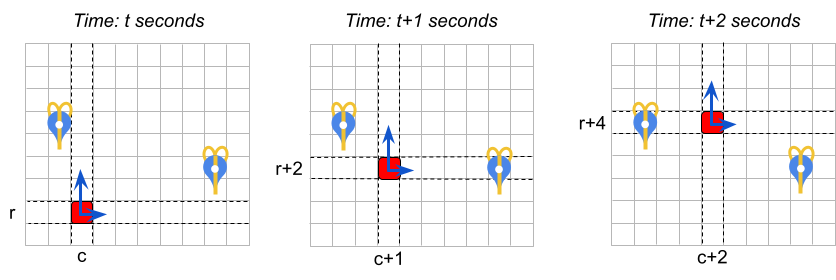 :::
:::
::::
Each second, Santa can choose to feed one carrot (previously loaded to the sleigh) to the reindeer to accelerate by a chosen value in one of four directions: up, down, left, right. "Acceleration" means changing the velocity. If the velocity is initially and Santa accelerates, then:
Note that the concept of "acceleration" (defined above) allows Santa to "decelerate" (slow down) as well. For example, if accelerating up by 2 makes Santa's sleigh go faster, then a subsequent "acceleration" down by 2 will make them go slower.
Santa can choose to accelerate, but even magic sleighs have their limitations! The maximum acceleration that Santa's reindeers can provide at a given moment depends on the current weight of the sleigh. The heavier the sleigh, the slower the maximum acceleration!
The weight of the sleigh is a sum of:
Each input data set specifies the maximum acceleration in given ranges of sleigh weights. Maximum acceleration of for sleigh weight range means that the maximum acceleration is equal to (inclusive) for all sleigh weights of that meet the constraints of .
This sleigh weight above includes the carrot just about to be eaten by the reindeer. However, right after the acceleration, the carrot is eaten and converted into reindeer energy, instantaneously reducing the weight of the sleigh by kg.
If reindeer can't handle the weight of the sleigh ( is above maximum ) they can't accelerate at all (max acceleration = 0). The sleigh keeps its speed and continues floating until acceleration becomes possible again (e.g. gifts are delivered) or the time runs out. Also, if there are no carrots on the sleigh, acceleration is not possible!
The acceleration is instantaneous and happens in the beginning of the second. Santa's sleigh can only accelerate once per second (it must float for at least one second before another acceleration is possible).
Consider the example represented in the description and the figure below.
The acceleration ranges are as follows, for the sleigh weight denoted as :
::::info[For example:]
The initial weight of the sleigh consists of 20 kg of presents and 11 kg of carrots. So the total weight is 31 kg which means the maximum acceleration is 2. The initial velocity at seconds is .
:::align{center}
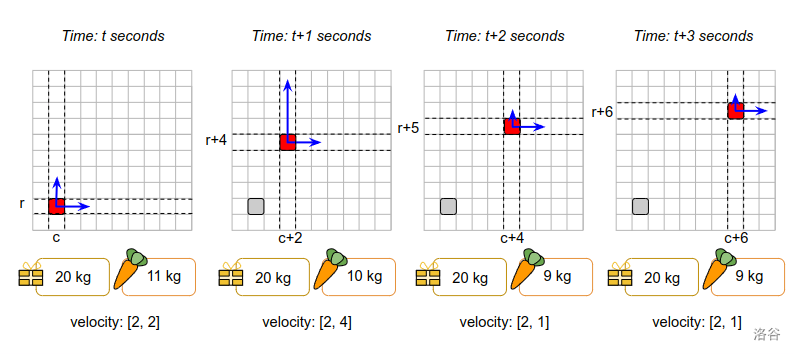 :::
:::
::::
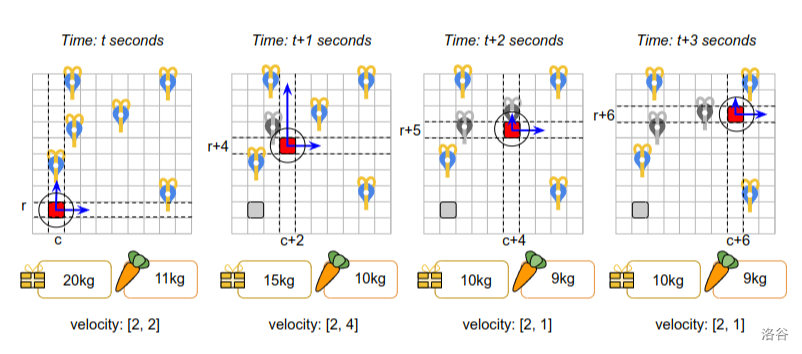
Note that the weight of the sleigh is also updated when gifts are delivered to children.
::::info[For example:]
Consider the example below. The sleigh movement is the same as in the figure above, but we add gift deliveries. The range is .
Observe that, even though between and the sleigh passes close to the gift delivery location at , it is not possible to deliver it. This is because gift deliveries must happen at the beginning of a second, not while the sleigh is floating.
:::align{center}
 :::
:::
::::
The sleigh can perform the following actions. All actions apart from "Float" are instantaneous (take 0 seconds). All actions can be performed regardless of whether the sleigh is moving (no need to stop to make deliveries or load the sleigh).
:::info[For example:]
For instance, the following 3 sequences of actions are valid:
Observe that in (3) the last "Accelerate up" action is not affecting the final position of the sleigh: the velocity is updated, but the sleigh doesn't move at the updated velocity until a "Float" command is issued.
The following 2 sequences of actions are invalid because there are two acceleration actions without any float action between them:
Input Data Full input (zipped)
Each input data set is provided in a plain text file. The file contains only ASCII characters with lines ending with a single '\n' character (also called "UNIX-style" line endings). When multiple strings and numbers are given in one line, they are separated by a single space between each two elements.
The first line of the input file contains:
The subsequent lines contain the acceleration ranges description - two integer numbers separated by a single space:
Note that the weight range of the sleigh for max acceleration is where . It is guaranteed that and
The subsequent lines contain gift descriptions - strings and integer numbers separated by single spaces:
Every position in the datasets is guaranteed to have at most 1 gift recipient and Lapland at is guaranteed to have none.
You need to specify the actions for Santa.
The submission file must be a plain text file containing exclusively ASCII character lines terminated with a single '\n' character ("UNIX-style" line endings).
The first line must contain a single integer (): the number of actions for Santa.
Each of the following lines must contain a valid action for the sleigh. Each action description must contain the action name and the action argument, separated by a space. The possible actions are:
15 3 4 4
15 8
30 6
45 4
60 2
Olivia 1 10 5 1
Emma 2 10 -10 1
Liam 5 10 8 4
Bob 10 15 0 -100
23
LoadCarrots 10
LoadGift Olivia
LoadGift Liam
AccRight 4
Float 1
DeliverGift Olivia
AccUp 2
Float 1
DeliverGift Liam
AccLeft 8
Float 1
AccDown 4
Float 1
LoadGift Bob
AccRight 4
Float 1
AccDown 6
Float 1
AccDown 6
Float 1
AccDown 6
Float 4
DeliverGift Bob
| Input file | Description |
|---|---|
15 3 4 4 |
15 seconds, delivery distance of 3, 4 acceleration ranges and 4 gifts |
15 8 |
For weights from 0 to 15, max acceleration is 8 |
30 6 |
For weights from 16 to 30, max acceleration is 6 |
45 4 |
For weights from 31 to 45, max acceleration is 4 |
60 2 |
For weights from 46 to 60, max acceleration is 2 (For weights bigger than 60 kg, max acceleration is 0) |
Olivia 1 10 5 1 |
Gift for Olivia, score 1, 10 kg, at (5, 1) |
Emma 2 10 -10 1 |
Gift for Emma, score 2, 10 kg, at (-10, 1) |
Liam 5 10 8 4 |
Gift for Liam, score 5, 10 kg, at (8, 4) |
Bob 10 15 0 -100 |
Gift for Bob, score 10, 15 kg, at (0, -100) |
Note that the input file does not contain any blank lines. Blank lines and line wrapping in the example above are added for clarity.
| Submission file | Description |
|---|---|
23 |
The file describes 23 actions |
LoadCarrots 10 |
Load 10 carrots, increasing the weight to 10 kg |
LoadGift Olivia |
Load Olivia's gift, increasing the weight to 20 kg |
LoadGift Liam |
Load Liam's gift, increasing the weight to 30 kg. Max acceleration is now 6 |
AccRight 4 |
Accelerate, changing velocity to and weight to 29 kg |
Float 1 |
Let 1 second pass. Santa moves to |
DeliverGift Olivia |
Deliver Gift to Olivia, reducing weight to 19 kg |
AccUp 2 |
Accelerate, changing velocity to and weight to 18 kg |
Float 1 |
Let 1 second pass. Santa moves to |
DeliverGift Liam |
Deliver Gift to Liam, reducing weight to 8 kg. Max acceleration is now 8 |
AccLeft 8 |
Accelerate, changing velocity to and weight to 7 kg |
Float 1 |
Let 1 second pass. Santa moves to |
AccDown 4 |
Accelerate, changing velocity to and weight to 6 kg |
Float 1 |
Let 1 second pass. Santa moves to |
LoadGift Bob |
Load Bob's gift, increasing the weight to 21 kg. Max acceleration is now 6 |
AccRight 4 |
Accelerate, changing velocity to and weight to 20 kg |
Float 1 |
Let 1 second pass. Santa moves to |
AccDown 6 |
Accelerate, changing velocity to and weight to 19 kg |
Float 1 |
Let 1 second pass. Santa moves to |
AccDown 6 |
Accelerate, changing velocity to and weight to 18 kg |
Float 1 |
Let 1 second pass. Santa moves to |
AccDown 6 |
Accelerate, changing velocity to and weight to 17 kg |
Float 4 |
Let 4 seconds pass. Santa moves to |
DeliverGift Bob |
Deliver Gift to Bob, reducing weight to 2 kg |
Note that the submission file should not contain any blank lines. Blank lines and line wrapping in the example above are added for clarity.
In order for the submission to be accepted, it must fulfill the following conditions:
The score of your solution is the sum of the scores awarded for each gift that have been delivered.
For example, the sample solution scores points: for Olivia's gift, for Liam's gift, and for Bob's gift.
Note that there are multiple data sets representing separate instances of the problem. The final score for your team will be the sum of your best scores on the individual data sets.
